
Immersion Experience – Idea to Agent
Experience how Microsoft Copilot carries a single idea across apps—from a spark of inspiration to a working agent. You'll brainstorm a company or product concept, shape it into a document, turn that into a pitch deck, and finish by building a custom agent grounded in your own work.
You'll perform four tasks:
- Brainstorm and research an idea in Copilot Chat
- Draft a concept document in Copilot in Word
- Generate a pitch deck in Copilot in PowerPoint
- Build a custom agent in Copilot Studio
Each task produces an artifact the next task builds on, so save your files to OneDrive as you go.
NOTE: Sample prompts are provided to get you started—personalize them to fit your idea. If Copilot doesn't nail the output first time, refine your prompt and try again.
Task 1: Brainstorm & Research an Idea (Copilot Chat)
Use Copilot Chat to spark a company or product idea that fills a real market gap, then research the competitive landscape.
Steps:
Open a browser and navigate to m365.cloud.microsoft/chat.
Sign in with your Microsoft work account and type in the following prompt:
Sample Prompt (brainstorm):
textHelp me identify gaps in the [specific market or industry] that could be opportunities for a new product or company. Look for underserved areas or emerging trends to capitalize on.Sample Prompt (research competitors):
textI'd like to explore the [industry or market segment] sector. Who are the key competitors?Copy both responses into a new Word document and save it to OneDrive as Copilot Research.docx.
IMPORTANT: Save to OneDrive (not your local PC)—the next tasks need Copilot to access this file.
Task 2: Draft a Concept Document (Copilot in Word)
Turn your research into a comprehensive concept—mission, vision, values, offerings, target audience, and market edge.
Steps:
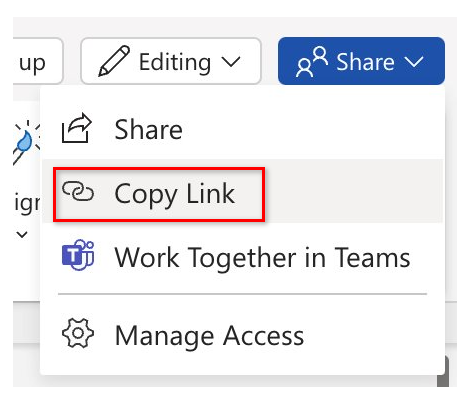
Open Copilot Research.docx, select Share → Copy Link.
Launch Word at Word.new, open a blank document, and select Draft with Copilot.

Sample Prompt:
textDraft a concept for our new [company or product] referencing [link to Copilot Research.docx], including its mission, vision, core values, offerings, target audience, and unique market edge.Select Generate, review the draft, then save to OneDrive as Product Concept.docx.
TIP: Refine before saving—e.g., "Make this more persuasive for potential sponsors" or "Improve the summary to make it more concise and impactful."
Task 3: Generate a Pitch Deck (Copilot in PowerPoint)
Transform your concept into a board-ready pitch deck that highlights value, market potential, and competitive edge.
Steps:
Open Product Concept.docx and select Share → Copy Link.
Launch PowerPoint at PowerPoint.new and open a blank presentation.
In the Copilot pane, choose Create presentation from file and paste your link.
Sample Prompt:
textCreate a presentation from [Link to Product Concept.docx].Review the generated slides and refine as needed.
TIP: Enhance with prompts like "Add 2 slides detailing potential challenges this product may face, plus a slide outlining strategies to mitigate them."
Task 4: Build a Custom Agent (Copilot Studio)
Bring it full circle by building an agent grounded in the files you just created.
Steps:
Start in Copilot Studio
Navigate to m365.cloud.microsoft/chat and sign in.
Select Create an agent in the right-hand rail to launch Copilot Studio.

Define your Agent (Describe tab)
textYou're a virtual assistant for our [project/team name]. Your role is to help with [key tasks]. Be concise, stay on-brand, and reference our shared resources when possible.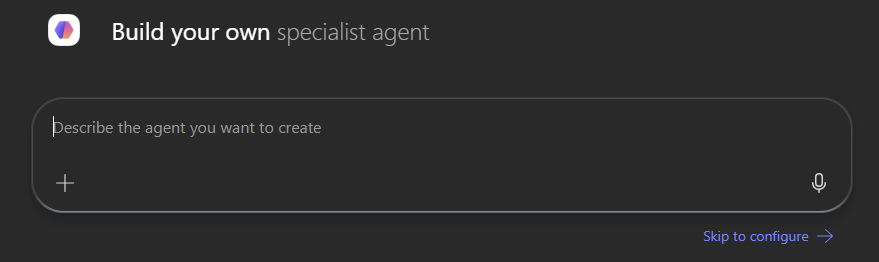
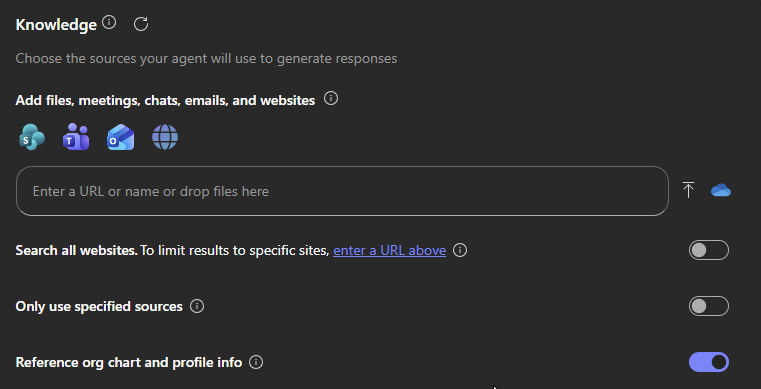
Customize your Agent (Configure tab)
Add a knowledge source—use your Copilot Research.docx or Product Concept.docx from OneDrive/SharePoint.
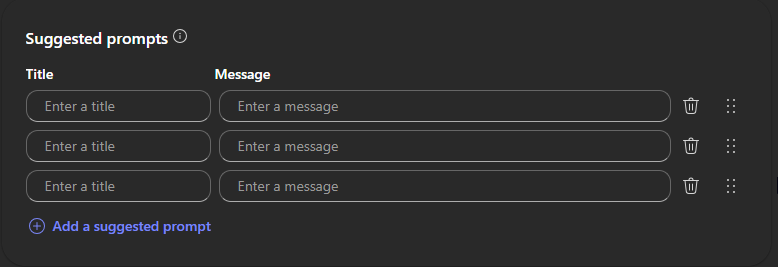
Define starter prompts to guide others in using your agent.
Test and Create
- Use the Test pane to try your draft agent and refine any issues.
- Select Create to publish, then share it for immediate use.
IMPORTANT: Add and configure knowledge sources before publishing if you want your agent to pull from specific content.
Outcome of This Workshop
By the end of this session, you'll have moved one idea end-to-end through Copilot:
- A researched market opportunity
- A concept document
- A board-ready pitch deck
- A working, knowledge-grounded agent