
Marketing Demo
Scenario:
You're on the Marketing team for a beverage brand preparing to launch Mystic Spice Premium Chai Tea in Latin America. You'll use Copilot to pull product, trend, and promotion docs into a single market analysis, then pressure-test which social campaign best fits the LATAM audience and generate a slogan, and finally interrogate your social-marketing data in Excel to size the opportunity.
Demo Setup
The sample documents can be found in the MS-4021 GitHub repository here:
The specific files needed for this demo are:
NOTE: Allow up to 10 minutes for these files to sync to your OneDrive after downloading. To avoid delays during the demo, ensure these files are downloaded and available in your OneDrive well in advance. If the files are not available, open the documents and copy the shared file links to use in the demo.
Demos
Copilot in Word
Use Copilot in Word to draft a detailed market analysis report and brainstorm creative marketing campaign ideas tailored to the Latin American market.
Open Word (either in your browser or desktop application).
In the Describe what you'd like to draft with Copilot? prompt box, type the following:
textCreate a Market Analysis report for Mystic Spice Premium Chai Tea using the attached files. Include the product description, market trend analysis, and a promotion plan for Latin America. [Promotion_Plan_for_Chai_Tea_in_Latin_America.docx], [Mystic_Spice_Premium_Chai_Tea_product_description.docx], [Contoso_Chai_Tea_market_trends.docx]NOTE: Brackets indicate that a document is being referenced. When referencing a document, you can paste the shared link directly or reference the file name if it is available in your OneDrive.
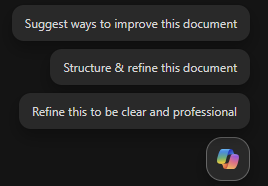
Now, select the Copilot icon that appears in the bottom right hand corner of the document.
Ensure Allow editing is selected.
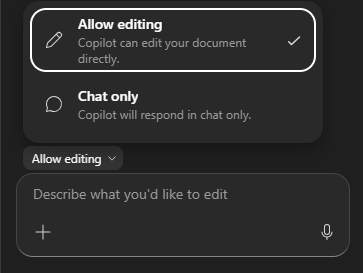
Have Copilot create a new section to add social media campaign ideas:
Input the following prompt:
textDraft a new section for social media campaigns to promote Mystic Spice Premium Chai Tea. Include a brief description of 2-3 campaign ideas, each with a unique focus. For each campaign, provide a tagline that reflects its theme and resonates with our target audience of young professionals and tea enthusiasts.Select Done once you're happy with the content. Then, save the document as LATAM_Market_Analysis.docx for use in the next part of the demo.
Copilot Chat
Use Copilot Chat to evaluate the effectiveness of proposed social media campaigns and refine strategies for cultural relevance in the LATAM market.
Open a browser and navigate to M365copilot.com.
Ensure Web mode is selected.

In the prompt window, type the following:
textReview the social media campaigns outlined in the LATAM_Market_Analysis.docx file. Evaluate which campaign might resonate best with the LATAM market based on cultural relevance, target audience preferences, and alignment with regional trends. Provide reasons for your choice and suggest any adjustments to improve its impact.NOTE: Do not submit the prompt yet. Move to the next step to upload the file.
Select Add and manage sources > Add work content and search for LATAM_Market_Analysis.docx then submit the prompt.
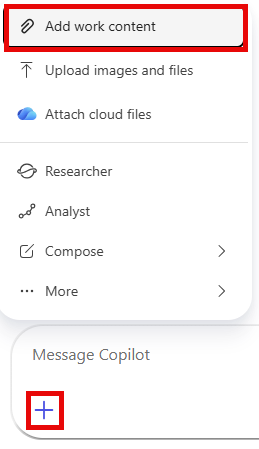
NOTE: If the file is not available, you can select Upload images and files to upload the file directly.
Copilot should recommend one of the campaigns to focus on and provide suggestions for improvement. In the next prompt, we want Copilot to suggest a marketing campaign slogan for this new idea:
textGenerate a catchy marketing slogan for the [Campaign name - e.g., 'Morning Motivation'] campaign that highlights its unique value proposition and resonates with the LATAM market. Ensure the slogan reflects a vibrant and culturally relevant tone that appeals to young professionals.Optionally, for the last prompt, you can ask Copilot to generate a new video for the campaign:
While in Copilot, select the app selector and then select the Create Agent. Under What do you want to create? select Create a video. Then, input the following prompt:
textCreate a captivating social media video for Mystic Spice Chai Tea that highlights its unique flavor and vibrant appeal. The video should feature eye-catching visuals, with colors, and themes that resonate with young professionals and tea enthusiasts.
Copilot in Excel
Now let's switch gears and use Copilot in Excel to size the social-marketing opportunity — we'll ask questions of the campaign data without altering the underlying sheet.
Ensure you have downloaded Contoso_Chai_Tea_social_marketing_trends.xlsx and open the document in Excel (either on the web or desktop application).
Select the Copilot icon in the bottom right hand corner of the document.
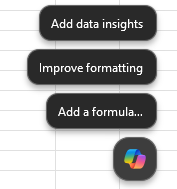
Switch from Edit mode to Chat mode in the Copilot pane.
Type in the following prompt into Excel:
textOn average, how many sales do we get per social media campaign view?Next, ask Copilot to compare sales to social media engagement:
textCan you show a correlation between social media engagement and sales?Next, type in the following prompt:
textHow many social media campaign views did we have from September to December?
Key Takeaway
In one sitting, you took a campaign from blank page to data-backed plan — using Copilot in Word to pull product, trend, and promotion docs into a single market analysis with fresh social-campaign ideas; Copilot Chat to evaluate which campaign best fits the LATAM audience and spin up a culturally resonant slogan; and Copilot in Excel to interrogate your social-marketing data and quantify the opportunity. What used to span days of research, drafting, and analysis collapses into a focused, end-to-end workflow.