Dispatch
You run the room, then turn it into something you can watch.

Hand it to Scout.
What you're solving
One triager isn't enough when the same skilling request means different work to different teams. A governance-before-GA ask is an evergreen learning path to one team, a live workshop to another, and a partner-first activation to a third - and one of those deliverables should be built once and reused by the others.
A single triager picks one owner and misses all of that. Here you seat a room of teams, dispatch the same request to each, and put the whole room on a live board so the plan - and the reuse - is something you can see.
What you'll walk out with
| What you make | What it does |
|---|---|
| Your room | Three or more teams and what each one wants, in THE-ROOM.md. |
| A dispatch | Each team's position on the same request, grounded in its charter. |
| A live dashboard | Each team lights up with its position, and the room lands one decision. |
| A one-step run | A simple way to start the board - a command or a scheduled task. |
The single triager stays unchanged - the one-owner "before" you compare against.
How this runs
Four steps. The first two are quick; the board is the build.
| Step | You're done when | |
|---|---|---|
| 1 | Import & load | Scout has the Dispatch skill and the data pack loaded. |
| 2 | Seat a room that splits | Three teams return different positions on the same request - proven in conversation, nothing built yet. |
| 3 | Put the room on a board | You drop a request on a live dashboard and the teams light up with their positions. |
| 4 | Make it one-step to run | You can start the board with one command or a schedule. |
Step 2 you do as a table - each person seats one team, then you combine them into one room. Steps 3–4 are the build.
Every step gives you a line you can paste. Change it - it's a starting point, not the answer.
Before you start
Download both and keep them side by side.
Open Microsoft Scout and add the Dispatch skill. The dashboard step later also uses GitHub Copilot CLI and Node - Scout installs what the app needs, but the CLI has to be signed in and working.
1 · Import & load
Done when: Scout has the Dispatch skill and the data pack loaded.
Extract
the-dispatch.zipand, in Scout, go to Extensions → Import and drag the extracted skill folder in.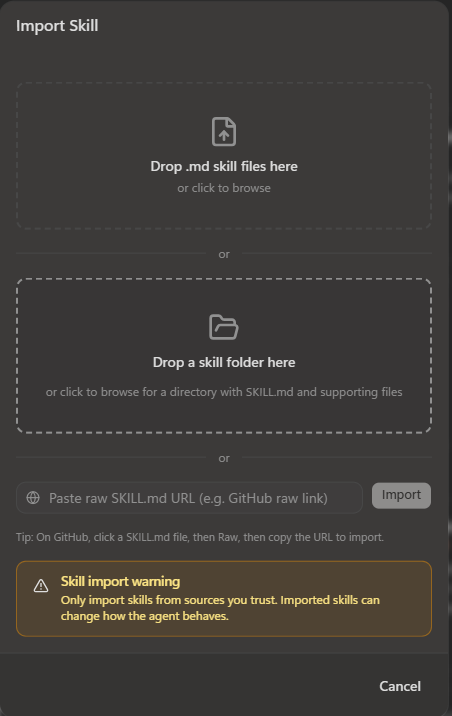
Start a new chat in Scout and upload dispatch-data-pack.zip.
2 · Seat a room that splits
Done when: three teams return different positions on the same request - proven in conversation, with nothing built yet.
A seat is one team - what it owns, who it serves, and what makes it want a request or pass it on. The goal isn't to list teams - it's to seat ones that disagree about the plan: a team that would route everything the same way as another is a duplicate.
As a table, each person seats one team - start with Content & Insights, Delivery & Program Operations, and Field & Partner, the sharpest trio - then combine them into one THE-ROOM.md. Ask Scout to seat them, then dispatch RQ-01, the request chosen to prove the point:
"Use Dispatch to seat Content & Insights, Delivery & Program Operations, and Field & Partner from the data pack, then dispatch RQ-01 (agent governance before GA)."
Dispatching is the heart of it: every team takes a position on the same request at once - grounded in its charter - and the room lands one decision. RQ-01 is exactly the case where the room agrees who owns it (Content & Insights) but splits on the plan: build the path once and reuse it live and regionally, and repoint the audience to partners-first.
| Request | Single triager | The room |
|---|---|---|
| Governance before GA (RQ-01) | Send it to Content & Insights | C&I builds the path once · DPO & Field & Partner reuse it · audience repointed to partners-first |
That split - same request, one owner but three reuses, each charter-backed - is the result of this step. The thinking is done here, with nothing installed; everything after just makes it visible and repeatable.
Seat a real team with Work IQ
Scout is grounded in your Microsoft 365 work through Work IQ - it only ever sees what you already can. Ask it to draft a team's charter from those real signals - "Scout, draft a team card for [a team you work with] from Work IQ that mimics the cards in THE-ROOM.md" - then correct it with people who know that team. Treat it as a first draft, not the answer.

Scout builds the board.
3 · Put the room on a board
Now make the plan visible. Ask Scout to build a local web dashboard for the room, using GitHub Copilot CLI as the backend that runs the Dispatch skill.
Describe what you want:
- a card for each team that shows its position - in, support, or out - as you dispatch a request
- the deliverable and reuse each team proposes, on its card
- a place to drop in a request or paste a rough idea
- the final routing decision - owner, audience, and the build-once/reuse plan - at a glance
- a creative theme for the room or a custom name
Scout scaffolds the app and wires it to the Copilot CLI backend. When you feed the board a request, the CLI runs the room and the cards update.
Stuck on the prompt? Start with this
Paste this into Scout, then adjust from there:
Build me a local web dashboard for the Dispatch room. Use GitHub Copilot CLI as the backend to run the Dispatch skill: a small Node web server that shells out to
copilot, with a plain HTML/CSS/JS front-end - no build step, minimal dependencies, so it starts with one command. Show a card for each team inTHE-ROOM.mdwith its position (in / support / out), its proposed deliverable, and any reuse. Add a place to drop a request or paste a rough idea, and a panel for the final routing decision - owner, audience, and the plan of deliverables with who builds and who reuses. Start simple - I'll ask for more.
The real trick is to start small and layer on: get the team cards showing positions on one request first, then ask for one addition at a time (the decision panel, a reuse map, a theme) instead of everything in a single prompt.
If the app won't start
Setups vary - Node versions, dependencies, CLI sign-in. If the dashboard won't run on your machine, keep going in the Scout conversation; the room still works there. Get the board up if you can, but don't let it block the dispatch.
Done when: you feed the dashboard a request and watch the teams light up with their positions.
4 · Make it one-step to run
Turn the dashboard into something you start in one step, so a teammate can open the board without wiring it up again. Ask Scout for either:
- a single start command - install once, then one command boots the server and opens the browser, or
- a scheduled task that launches it so the board is always there.
Unsure how? Ask Scout!
Ask Scout what the right option is for your situation. One solution doesn't fit everyone - much like the different teams in this exercise. Ironic, don't you think?
Done when: you (or a teammate) can start the board in one step and drop in a new request.
Go further - the bonus
Once the board runs, the bonus is adding features to it. Keep each one small and let Scout build it:
- an intake gate badge - flag a rough idea as "sharpen first" before the room routes it
- a reuse map - draw the build-once deliverable fanning out to the teams that reuse it
- a history, so you can watch a request get sharpened and re-dispatched
- a button that opens a work item for the decision's owner
- animations for when the room is deliberating

Always-on. Hands-off.
Stuck?
| What you're seeing | What to do |
|---|---|
| Scout ignores the skill | Start a new session - skills load at the start. |
| Every team gives the same position | Give them more distinct charters. |
| The dashboard won't start | Check that GitHub Copilot CLI is signed in and Node is available; meanwhile, dispatch in the Scout conversation. |
| The board shows nothing back | Confirm the skill is imported and the CLI can run it on its own first. |
| The room can't see the request | Give Scout the data pack, and point the board at the same files. |
🎬 Nobody nails it first try

Maybe too hands-off.
Let Scout off the leash and it might build you forty booths. When it overshoots, rein it in and re-run - steering the agent is the build.