The Digital Twin
Copilot already knows a lot about how you work. Its memory and Work IQ read across your mail, calendar, and Teams, so most drafts start close to right.
What it can't do is show you the picture it's formed of you, let you fix where it's wrong, or carry it into another tool. The calls you actually make - which priority wins when two collide, what you never send without checking, whose sign-off you wait for - it just re-guesses, session after session. So you re-brief it from scratch each time, and rewrite most of what it hands back.
Objectives
Build a digital twin: a SKILL.md plus a references/ folder that hold how you work. Cowork writes the first version from your own mail, calendar, and Teams; you spend the session making it accurate and teaching it what it can't infer.
| File | Holds |
|---|---|
persona.md | Who you are and how you decide - who you serve, what wins when priorities collide, what you check before committing, and what's live right now |
voice.md | How you write, plus a few of your own messages kept verbatim, so what comes out sounds like you rather than like Copilot |
By the end, your twin should:
- Sound like you - draft in your voice and take the positions you'd take, with a rule you can point to behind each one.
- Match how you actually work - you've corrected the first read it wrote of you, fixing what it got wrong.
- Know what it couldn't infer - you've added the context your history can't show: the people you deal with, what you've committed to, what's already been decided.
Setup
Three quick steps to a working twin. Open Cowork - if it doesn't load, grab a coach.
1 · Download your twin
🧬Your twinThe skill that reads your work and builds itself. Saves as SKILL.md - leave it in your Downloads folder.Download SKILL.md →2 · Install it
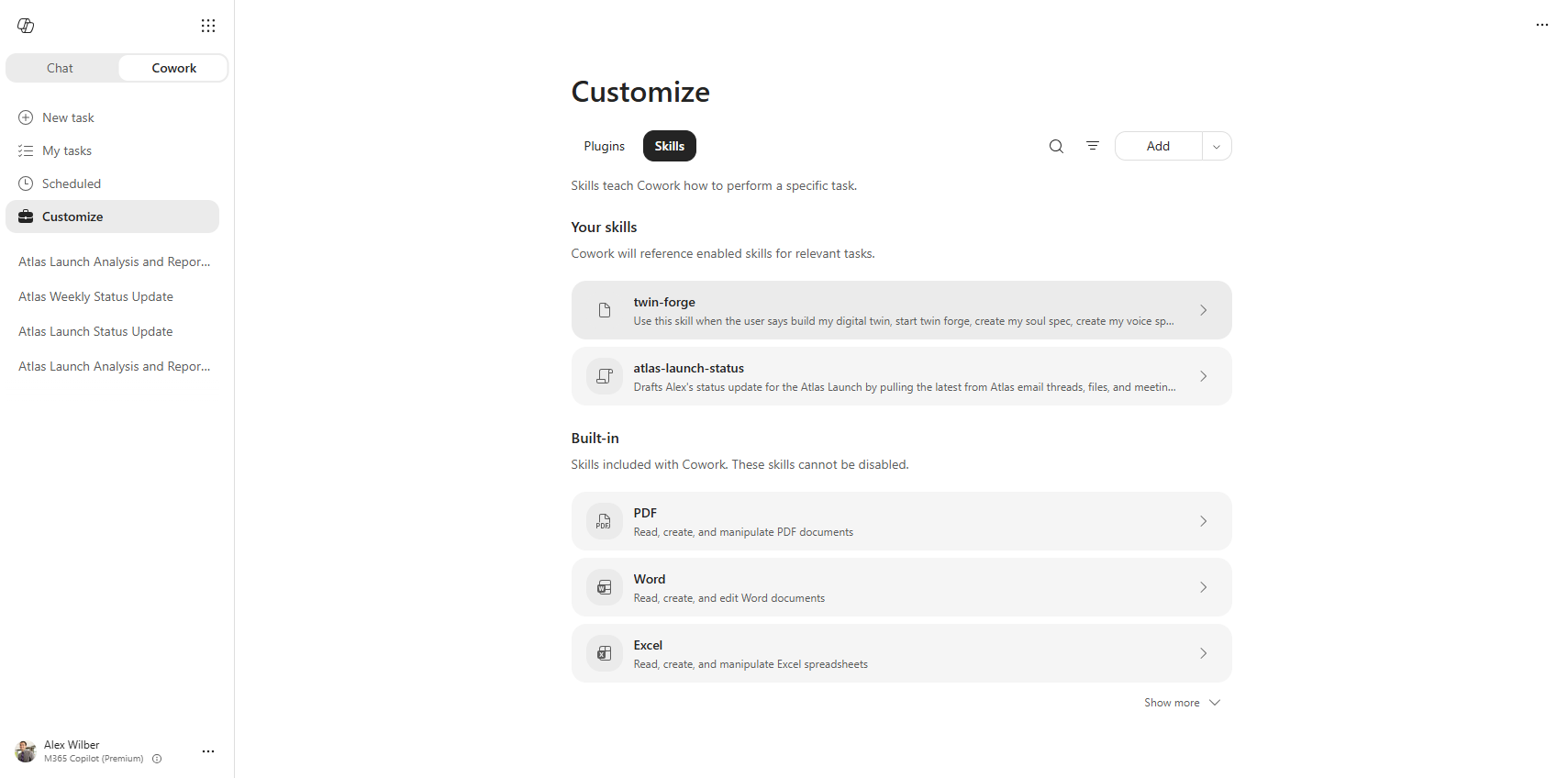
- In Cowork, open Customize in the left menu.
- Open the Skills tab.
- Select the arrow next to Add, then Upload skill.
- Choose the
SKILL.mdfile from your Downloads folder.
How a skill works
A skill is a plain-text Markdown file, SKILL.md, containing instructions Cowork loads and follows.
The file opens with frontmatter - a name and a description. Cowork chooses which skill to load by matching your request against the description, so the description defines when the skill applies. The body below the frontmatter is the instructions.
Skills are saved in your OneDrive under Documents/Cowork/skills/<name>/. A skill can include a references/ folder of additional .md files; the skill reads them when its instructions call for them. Your twin writes its own references there.
SKILL.md follows the Agent Skills open standard, so the same files run in other tools that support it, such as GitHub Copilot in VS Code.
3 · Build it
Start a new task and type in the following prompt:
Set up my twin.It tells you what it's about to read and waits for a yes, then reads your sent mail, Teams messages, and about a month of calendar. Its access is read-only - it can only see what you already have access to, and it has no permission to send or share anything.
Cowork asks before it changes anything
When a prompt makes Cowork add or edit a file - your persona, a reference - it shows you the change and waits for you to approve or reject it. That's expected; approve to let it through.
It comes back with a draft of both files and writes itself into your OneDrive:
Documents/Cowork/skills/my-twin/
  SKILL.md          ← the instructions. This is the file you uploaded
  references/
    persona.md      ← who you are and how you decide
    voice.md        ← how you write
    setup.md        ← how far it got, so it can pick up if you get pulled away
Everything in references/ is read automatically before the twin answers.
Test it with a real question:
Using my twin, what should I do about [the thing you've been putting off]?It should take the position you'd take. Start your request with the twin's name - "using my twin" or "ask my twin" - or Cowork may not call the skill.
Give it a name you'll actually use. Tell Cowork to rename it - "rename my twin to Clippy" - then call it by that from now on: "Clippy, what should I do about...?"
Build
Your twin works, but it's generic - built from what your work proves, which isn't the same as what you'd say about yourself. Do a quick correction pass, then get to the main event: teaching it what it can't see.
Keep it yours. You each build your own twin on your real mail and rules - so when you compare with your table, share proof, not contents: one thing that changed, one thing it got wrong. Nobody needs to see your inbox.
Quick-correct your twin (~15 min)
Your twin's first read of you is close, not right. Do one short pass, then move on to the main event below - you'll keep fixing it as you go.
- Look at what it built - ask something like "show me my persona.md." Start with the lines tagged
[inferred]or[needs you]; they're likeliest to be wrong. - Fix two or three lines that change what it does - a name, a date, a threshold, a hard no. "Balance competing priorities" changes nothing; "when an internal deadline and a customer's collide, protect the customer's" does.
- Test it, then move on. Ask a question you asked earlier and see if the answer moves. If nothing changes, the line was too vague.
Prompts are examples, not scripts
Say it however you'd naturally say it - the twin understands paraphrase.
What the persona tags mean, and what to add if you're stuck
Each section of your persona is tagged by how directly the twin knows it:
[observed] | It found this in your mail, chats or calendar, and can quote it |
[inferred] | A reasonable read of what it found, but you never said it outright |
[needs you] | Your work didn't cover this, so it wrote a starting point for you to react to |
Stuck for what to add? Ask it something like "what don't you know about how I work that would change your answers?"
Pick a direction
Your twin now knows you - your judgment and your voice. What it doesn't know is the context around you: the people you work with, what's already been decided, what the work is for, and what you're actually working on right now. You add that as references.
Decide as a table which reference to add, then build it in parallel - each of you adds the same one to your own twin, so you can compare what worked. The list below is a starting menu; pick what's useful or invent your own. Start with one, add more if you've got time.
Build each reference by iterating with Cowork: paste a prompt from the table, see what it drafts, then refine. You'll know it worked when the twin pulls the reference in on its own: re-run an earlier request and see if the answer changed.
Use everything in the room - Copilot chat, the Guides, your SME, coaches, and the rest of your table.
What a skill looks like
The SKILL.md you uploaded. Frontmatter sets name and description; the body is the instructions:
---
name: my-twin
description: Use when the user says "using my twin", "triage what landed",
  or asks for a draft that sounds like them.
---

# My Twin

## Before every answer

Read everything in `references/` - persona.md first, then voice.md.

## Triage

When asked what landed, check mail and Teams, say how many items you
checked, then sort every one into Handled, Needs me, Blocked or Noise.
What a reference looks like
A file in references/; the twin can read as many as you like.
Here's a filled-in people.md, with made-up names:
# People

Read this whenever a named person is involved, or when I'm deciding
who to tell first.

## Dana - my manager
Skims everything. Lead with the date and the ask, under five lines,
no preamble. Wants to hear about a slip the day I know, not the week
it lands. Never surprise her in a meeting with something I could have
sent on Tuesday.

## Sam - peer, finance
Wants the number first and the reasoning second. Hates hedging - "roughly"
and "should be" both get a follow-up. If I don't have the number yet,
say so and give a date.

## Priya - partner marketing
Blocked more often than she says. If she's asking, she's usually been
waiting a few days already, so answer before the polished work.
Two-line yes with a date beats a paragraph.

## The Northwind team - external
Careful and brief. Never commit to a date, a number, or anything about
roadmap without checking with Dana first. No internal context, no
shorthand, no names they wouldn't recognize.

## Anyone I'm delivering bad news to
Say the thing in the first line. Then what I'm doing about it, then
what I need. Never bury it under context.
Two things make it work: it says when to read it at the top, and every line says what to do rather than describing the person. "Sam is detail-oriented" changes nothing. "Number first, no hedging" changes the next draft.
After today
This is a starting point, not the finish line. In one short session, alongside a table learning the same thing, you got a twin working and practiced the real skill: building and iterating with Cowork.
What you made today won't change the world, and it doesn't need to. The point is the muscle - say what you want, see what Cowork gives back, refine - and a twin that's yours to keep building on long after today.