Write a reusable Cowork skill
Tool: Cowork
Source status: Liftable from Agent Academy — Cowork Collective
A Cowork skill is a reusable instruction file. It tells Cowork when to load the skill, what role to play, what steps to follow, and what output to produce.
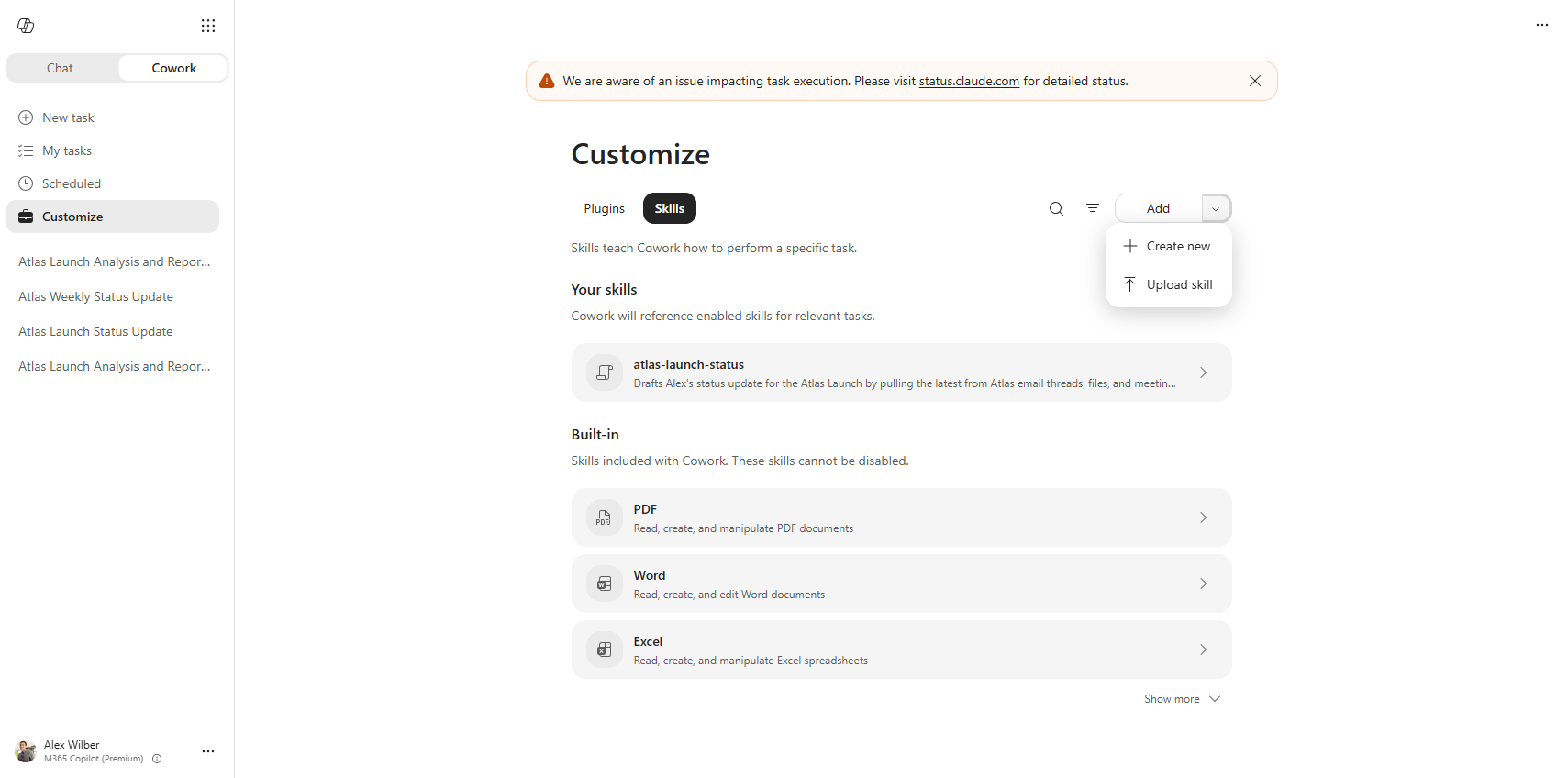
Steps
- Open M365 Copilot at
m365.cloud.microsoft. - Select the Cowork tab in the left nav. It sits at the top next to Chat.
- Select Customize in the Cowork left nav.
- Open the Skills tab. You will see a search icon, a filter icon, and Add. Skills are grouped into Your skills for custom skills and Built-in for built-in skills. Built-ins include Word, Excel, PowerPoint, PDF, Email, Scheduling, Calendar Management, Meetings, Daily Briefing, Enterprise Search, Deep Research, Communications, Adaptive Cards, and image generation. More appear behind Show more. Built-in skills cannot be disabled.
- Select Add. Use the chevron for More add options to open the menu. The menu has exactly two items: Create new and Upload skill.
- Choose your creation path:
- Create new: best for beginners. Choose this first. Cowork opens a guided flow, asks what the skill should do, drafts the instructions, and saves the skill for you.
- Ask Cowork in chat: say
Build a skill that...and let Cowork draft theSKILL.mdinteractively. - Author manually: create the file yourself in OneDrive at
/Documents/Cowork/skills/{skill-name}/SKILL.md.
- Give the skill a short kebab-case name, such as
meeting-briefordraft-reviewer. - Write a description that includes the phrases users will actually type. Cowork decides which skills to load from the description field.
- Add clear markdown instructions. Tell Cowork what to do, what not to do, and what output shape to use.
- Start a new Cowork session before testing. Custom skills are discovered automatically at the start of each session.
You'll know it worked when... your skill appears under Your skills, and a new Cowork task loads it when you use one of the trigger phrases from the description.
SKILL.md anatomy
Every skill starts with YAML frontmatter, then markdown instructions.
---
name: meeting-brief
description: Use this skill when I ask for a meeting brief, prep notes, stakeholder summary, or follow-up draft.
---

<!-- markdownlint-disable MD013 MD025 -->

# Meeting Brief

You are helping prepare for a work meeting.

When this skill is used, you MUST:
1. Identify the meeting, attendees, and goal.
2. Pull relevant calendar, email, Teams, and file context through Work IQ.
3. Return the output using the contract below.

Never invent missing context. If evidence is thin, say what is missing.

## Output contract

- Meeting goal
- People and likely priorities
- Decisions needed
- Risks
- Suggested opening
Rules to remember:
nameis required, 1-64 characters, and should be kebab-case.descriptionis required, 1-1024 characters, and should include trigger phrases.SKILL.mdcan be up to 1 MB.- You can have up to 50 custom skills.
- A skill can include up to 20 companion files and 10 MB total.
- For packaged or plugin skills, keep the body under about 5,000 tokens. About 1,500-2,000 words is ideal.
Folder layout
Cowork looks in OneDrive:
/Documents/Cowork/skills/meeting-brief/
  SKILL.md
  references/
    stakeholder-template.md
  scripts/
summarize-calendar.py- Put the main instructions in
SKILL.md. - Put optional background files in
references/. Cowork can load these into context when needed. - Put executable helpers in
scripts/. Scripts are executed, not read into context like reference files.
Honest limits
Cowork skills do not yet support agents/, commands/, or hooks/. You cannot call one skill from another. Cowork's runtime chooses which skills to load based on the description field.
Upload and share a skill
- To upload, go to Cowork → Customize → Skills → Add ▾ → Upload skill.
- Upload a
.md,.zip, or.skillfile. It must includenameanddescriptionin frontmatter. - To share, open the skill's detail page in Customize.
- Select Share.
- Choose Only you or Specific users in your organization.
- Re-share after edits so others get the latest version.
Why portability matters
Cowork uses the Agent Skills open standard. The same SKILL.md format is read by VS Code Copilot, Claude Code, Gemini CLI, Cursor, and 30+ other tools. That means your skill is not trapped in one UI. You are writing a portable work pattern.
Apply it to your scenario
Turn the repeated part of your scenario into a skill. If you would give the same instructions twice, put them in SKILL.md: when to run, what evidence to pull, what rules to follow, and what output to return.