🚀 Quick Deployment Guide - Non-Production
This guide provides the fastest path to deploying AI Citadel Governance Hub for development and testing environments. For production deployments, see the Full Deployment Guide.
⚡ Prerequisites
Required:
- Azure subscription with Contributor or Owner permissions
- Azure Developer CLI (azd) installed
- Azure CLI installed
Optional:
- VS Code with Bicep extension
- Git for version control
💡 Tip: You can use Azure Cloud Shell which has all tools pre-installed.
🎯 Deployment Options
Getting the template
First, initialize your local project in an empty folder (e.g. ai-hub-citadel-deployment):
azd init --template Azure-Samples/ai-hub-gateway-solution-accelerator -e ai-hub-citadel-dev --branch citadel-v1

# or use git clone:
# git clone https://github.com/Azure-Samples/ai-hub-gateway-solution-accelerator.git
# git checkout citadel-v1

# Make the repository your current directory:
cd ai-hub-citadel-deployment # it may differ if you used git clone
Then proceed to choose your deployment method:
Option 1: Default Quick Deploy (Recommended)
Deploy with minimal configuration using intelligent defaults:
# Authenticate to Azure
# append --tenant-id <your-tenant-id> if needed
azd auth login

# Initialize environment
azd env new ai-hub-citadel-dev-01

# Provision and deploy everything based on defaults
azd up
This will:
- ✅ Create a new resource group
- ✅ Deploy all infrastructure with default settings
- ✅ Create new Virtual Network with private endpoints
- ✅ Create new Log Analytics workspace
- ✅ Deploy 2 AI Foundry instances with sample models
- ✅ Enable all core features (PII detection, content safety, API Center)
Expected deployment time: 30-45 minutes
Option 2: Customized Quick Deploy
Customize key settings using environment variables:
# Authenticate and initialize
azd auth login
azd env new ai-hub-citadel-dev

# Set custom environment variables
azd env set AZURE_LOCATION eastus2
azd env set APIM_SKU Developer

# Deploy
azd up
Common Environment Variables
| Variable | Default | Description |
|---|---|---|
AZURE_LOCATION |
eastus |
Primary Azure region |
APIM_SKU |
StandardV2 |
API Management SKU |
COSMOS_DB_RUS |
400 |
Cosmos DB throughput |
EVENTHUB_CAPACITY |
1 |
Event Hub capacity units |
ENABLE_API_CENTER |
true |
Enable API Center registry |
For full list of variables, see /bicep/infra/main.bicepparam.
Option 3: Parameter File Deploy
Use the pre-configured dev parameter file:
# Authenticate
azd auth login

# Deploy using parameter file
az deployment sub create \
  --name citadel-dev-deployment \
  --location eastus \
  --template-file ./bicep/infra/main.bicep \
  --parameters ./bicep/infra/main.parameters.dev.bicepparam
The main.parameters.dev.bicepparam file includes:
- Developer SKU for cost savings
- Minimal capacity settings
- Public network access enabled (easier development)
- Application Insights dashboards enabled
- API Center disabled (reduce costs)
🔧 Post-Deployment Configuration
1. Verify Deployment
Deployment state are visible under Deployments in used resource group in the Azure Portal.
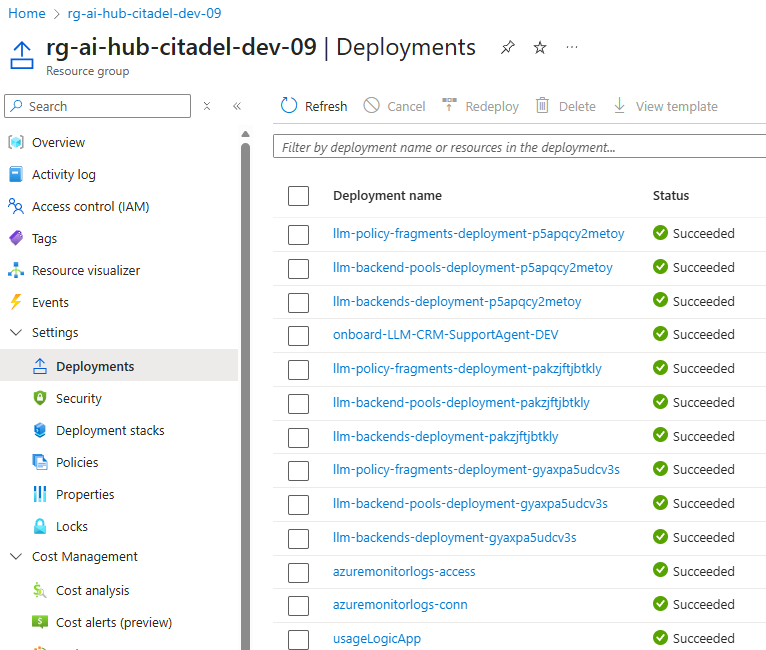
Also you can retrieve key information via AZD CLI:
# Get deployment outputs
azd env get-values
2. 🧪 Access AI Citadel Governance Hub
Head to validation part of this template to run through various validation and activities related to using Citadel Governance Hub.
📊 Monitor Your Deployment
Application Insights
- Navigate to Azure Portal
- Find Application Insights associated with APIM resource (name:
appi-apim-*) - View:
- Live Metrics
- Application Map
- Failures
- Performance
Usage Analytics
- Navigate to Cosmos DB resource
- Open Data Explorer
- Query
usage-dbdatabase,usagecontainer
SELECT * FROM c
WHERE c._ts > (GetCurrentTimestamp()/1000 - 3600)
ORDER BY c._ts DESC
🧹 Clean Up
Remove All Resources
# Delete all deployed resources
azd down --purge
🚨 Troubleshooting
Deployment Fails
Check provider registration:
az provider register --namespace Microsoft.ApiManagement
az provider register --namespace Microsoft.CognitiveServices
az provider register --namespace Microsoft.DocumentDB
az provider register --namespace Microsoft.EventHub
az provider register --namespace Microsoft.Insights
az provider register --namespace Microsoft.Logic
Check quota limits:
If you got quota errors, check your subscription limits.
APIM Takes Too Long
API Management deployment can take 30-45 minutes in classic tiers (Developer and Premium). This is normal.
⚙️ Default Configuration
The quick deployment uses these defaults (from main.bicepparam):
| Component | Setting | Value |
|---|---|---|
| APIM SKU | apimSku |
StandardV2 |
| APIM Units | apimSkuUnits |
1 |
| Cosmos DB | cosmosDbRUs |
400 RU/s |
| Event Hub | eventHubCapacityUnits |
1 |
| Network | useExistingVnet |
false (creates new) |
| Log Analytics | useExistingLogAnalytics |
false (creates new) |
| API Center | enableAPICenter |
true |
| PII Detection | enableAIGatewayPiiRedaction |
true |
📚 Next Steps
For Development:
For Production:
💡 Pro Tips
- Use Azure Cloud Shell - No local setup required
- Start Small - Use Developer SKU and minimal capacity
Need Help?