Some of your most repetitive writing isn't a document at all — it's the recap you assemble for your manager. Every week, or right before a 1:1, you stitch together what you got done: scrolling sent mail, checking off tasks, remembering which meetings mattered. It's the same gather-and-shape work you delegated earlier in this module, so it's a natural thing to hand to Cowork. In this exercise, you'll have Cowork reconstruct your week from your own Microsoft 365 activity and draft a manager-ready update you can review, adjust, and forward.
[!NOTE] This exercise runs in your own Microsoft 365 environment, so your results reflect your real work. Cowork adapts to the context it has — it may ask a clarifying question or open an action window for some learners and not others. If your experience doesn't match every step exactly, that's expected.
Before you begin
You'll need:
- Access to Microsoft 365 Copilot with Cowork.
- A week's worth of your own activity to draw on — sent mail, completed tasks, meetings, and Teams messages from roughly the last seven days.
Reconstruct your week
-
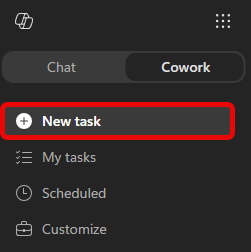
Open Microsoft 365 Copilot, select Cowork, and start a New task.
-
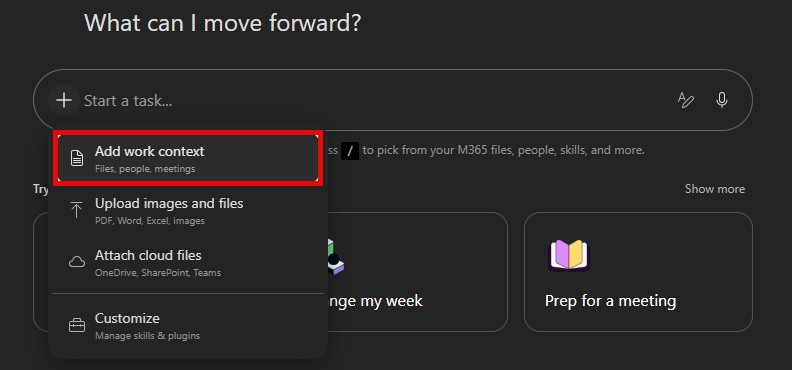
Give Cowork your work context. Select + → Add work context and point it at your recent activity: sent emails, completed tasks, meetings you led or attended, and an active Teams channel or two from the past week.
[!TIP] If you're not sure what to reference, just describe the window in your prompt (for example, "the last 7 days") and let Cowork search. Adding a few specific threads or tasks sharpens the result.
-
In the Start a new task... prompt field, copy and paste the following prompt:
Reconstruct what I accomplished at work over the past week and draft a concise manager update I can use in my next 1:1 or manager check-in. Before writing, review my Microsoft 365 activity from the last seven days: - Sent emails and threads I actively drove - Teams chats and channel messages where I contributed meaningfully - Meetings I led, presented in, or owned follow-up for - Files I created or edited across Word, PowerPoint, Excel, Loop, and OneNote Focus on work that moved something forward. Ignore routine back-and-forth, FYI noise, and status-only or recurring meetings unless they produced a decision, deliverable, or next step. Structure the update in three sections: - Accomplished — What shipped, progressed, or became clearer. Be specific, and tie each item to a real artifact, thread, or meeting. Don't include anything you can't point back to. - Needs input — Open questions, blockers, or decisions where I may want my manager's help. If there's nothing substantive, write "n/a." - Looking ahead — Work continuing or starting next week, inferred from this week's activity and my upcoming calendar. Don't transcribe my calendar; only name a specific meeting if it's real work I'm driving. Flag any upcoming out-of-office, handoffs, or timing risks. Keep it tight enough to skim in under a minute. If a section is thin, tell me what context to add rather than padding it. If you're unsure whether something belongs, flag it as uncertain instead of guessing. -
Select the send arrow (to the right of the prompt field) to submit the prompt.
-
Cowork should come back with a draft email ready to send. Review the draft.

Select Send to receive in your Outlook inbox, or Cancel to discard the draft and start over.
[!NOTE] Choosing Cancel discards the draft, it isn't saved anywhere. If we asked Cowork to draft an email instead, it would save to your Outlook Drafts folder.
Review what came back
Cowork's first draft is a starting point, not a finished answer. Check it against what you know:
- Does Accomplished reflect the work that actually mattered, with each item tied to something real?
- Is Looking ahead grounded in your genuine upcoming work, rather than a copy of your calendar?
- Did it surface anything you'd forgotten you did this week?
If a section feels thin or off, steer it: name the thread it missed, tell it to drop an item, or point it at more context — just as you refined results throughout the module.
Summary
You just turned a recurring chore into a single request. Instead of scrolling through mail, tasks, and meetings to reconstruct your week, you described the outcome you wanted and let Cowork gather, shape, and draft it — leaving you to do the part only you can: review and decide. That's the same delegation pattern you'll reach for whenever the work is gather, then summarize.